
Introduction
In early 2026, we identified a new, active intrusion campaign that we have named Operation ShadowCloud. The threat actor behind it is abusing the legitimate MeshAgent utility to drop two brand-new backdoors. These implants hide their command‑and‑control (C2) traffic behind cloud services Microsoft SharePoint, GitHub, and Ably, allowing the implants to blend in with normal traffic, effectively evading network-based detections.
We’ve called the implants GraphDoor and GitDoor, reflecting the cloud platform they use for C2. While their C2 protocols differ, the two backdoors share key capabilities:
- On‑demand plug-in download: fetching additional modules as needed
- In‑memory shellcode injection: loading malicious code directly into memory to extend functionality without touching the disk
The threat actor specifically deploys a modified Erfrp client and Ably messaging service-based plug-ins to proxy traffic between infected systems and C2 servers.
In addition to the plug-ins, we uncovered several shellcode families, most of them delivered as COFF (Common Object File Format) binaries. Our analysis reveals a sophisticated, modular toolset actively maintained and updated with multiple observed backdoor versions in the wild. We found victims in Asia and Africa, primarily within the government sector.
In a recent brief, Sophos touched on a fragment of this campaign. In this two‑part blog, we dive deeper, detailing the backdoors’ C2 communication methods, the assortment of shellcode families and plug-ins that the threat actor delivers to the compromised machines, and the infrastructure we observed supporting the operation. We also highlight the attribution clues:
- This article (Part 1 of the story) deals with the initial infection vector, the GitDoor backdoor, and various shellcode families the threat actor drops onto target machines.
- Part 2 provides details on the GraphDoor backdoor and the plug-in suite (Keylogging, Process Listing, Screen Capturing, Modified Erfrp Proxy, and Ably Channel Proxy) and examines the evidence that points to links with Chinese‑speaking threat groups.
Initial infection
During our investigation, we uncovered two separate instances of the MeshCentral Agent (MD5: 74b025084026d8d9a64661bf995d835b), which were launched inside a Taiwanese organization. MeshCentral is a web‑based tool that provides remote‑desktop control, command‑line access, and file‑management capabilities.
The exact entry point that let the attackers install the agent is unknown, but evidence points to the reuse of a prior infection already present on the network.
The MeshCentral Agent was hard‑coded to reach a remote server at wss://27.102.66[.]162:443/agent.ashx. Once the C2 session was established, the adversary used the agent to drop three additional items on the endpoint:
- A legitimate binary used for DLL sideloading
- A malicious loader DLL responsible for unpacking and executing further code
- An encrypted file containing the core payload
The threat actor used trusted executables to side-load malicious loader DLLs. We identified the following loaders used in these attacks: jli.dll, SbieDll.dll, python39.dll, WINMM.dll, and libcef.dll, which were dropped onto the host and then implicitly loaded by the respective legitimate binaries: the OpenJDK platform binary (javaw.exe, MD5: 8b78ef5609d942036e93721d75bd1f29), Sandboxie Start (start.exe, MD5: be739a7036dc8e2ee8608fba13c8c3a4), a Python application (pythonw.exe, MD5: 84802caf2579cfe7a38f079a64a3cd22), and the Sysinternals Screen Magnifier tool (zoomit.exe, MD5: d955d03104f988582cbd2967177693d3), which the attackers started as a Windows service.
Loaders
We discovered two distinct loaders, each using a different method to decode the encrypted backdoor payload. In both cases, the loader first decrypts the payload and then injects the resulting code into the current process’s memory. Loader (Type 1) employs a hybrid scheme: first running the data through an RC4 stream cipher and then applying an XOR mask, while Loader (Type 2) simplifies the process by using a straight XOR operation alone.
Type 1 Loader (MD5 32151547d912488ac5242731057170a3)
The loader jli.dll reads the file config.ini (MD5: 3896d44bc6d517291c60ee3f70543a31) located next to it using the native NtCreateFile/NtReadFile calls, then it transforms the obtained data through the following steps to generate the final backdoor:
- Base64‑decodes the data with a custom character set (
ABCDEFGHIJ01234ZYXWVUTSRQPONMLKzyxwvutsrqponmlkjihgfedcba98765/+) - Decrypts the first layer of encryption with a 16-byte RC4 key that varies across samples
- Decrypts the second layer of encryption with a 16‑byte XOR key, which is also sample‑specific
- Transforms the decrypted backdoor bytes by abusing the
RtlEthernetAddressToStringAandRtlEthernetStringToAddressAAPIs to evade defenses. First,RtlEthernetAddressToStringAis used to convert the decrypted backdoor bytes into an Ethernet MAC‑address string.

Convert bytes to MAC address string
Then RtlEthernetStringToAddressA is used to translate a human‑readable MAC address string into a six‑byte binary format, and the resulting bytes are written to memory newly allocated via an AllocADsMem API call.

Convert MAC address string to bytes
Finally, the loader changes the memory protection to PAGE_EXECUTE_READWRITE using VirtualProtect and jumps to the MZ header, which acts as a trampoline into bootstrap code. Since the decrypted backdoor executable is already in memory‑mapped format, the bootstrap code simply performs relocation, resolves imports, and, depending on whether the payload is an executable or a DLL, invokes its entry point. The bootstrap code dynamically resolves API addresses and uses CRC32 to compute a hash of each API name. Both the import library name and the associated API name are XOR‑decrypted with a hardcoded 7‑byte key \x11\xAF\xCE\xDC\xA6\x12\x05 before resolution.
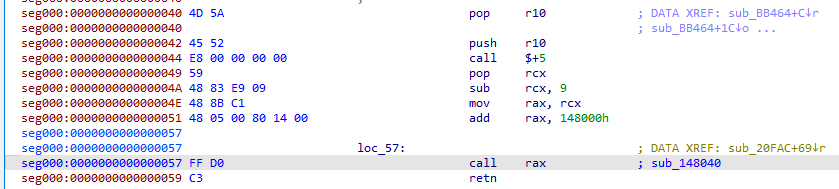
Execution from MZ bytes
Another similar loader jli.dll (MD5: e9d4081fac4a5111e6856f333d490439) has a different approach to API resolution. It reads an encrypted blob from config.ini (MD5: b930fb3ab14fe45b378d5acfa6e0a763), which decrypts to bootstrap code together with a backdoor executable (GraphDoor MD5: 14ec33ea808e697870d00c5e434c2952), which can be either an EXE or a DLL. The bootstrap code resolves the required APIs using an FNV‑1 hash. In the API hashing function, the FNV_offset_basis value changes, but the FNV_prime constant always remains 0x1000193. Once the necessary functions are resolved, the bootstrap code creates a file-mapping object called Local\sm%lu (where %lu is the current PID). Next, it reflectively loads the backdoor into its own process space and jumps to the backdoor’s entry point. If the payload is a DLL and exports functions, each export name is hashed with FNV‑1 and compared against the hard‑coded value 0x974C9EB; a match triggers that export. For cleanup, the bootstrap invokes the DLL’s DllMain with DLL_PROCESS_DETACH, unloads any loaded libraries via FreeLibrary, and releases the allocated memory with VirtualFree.
Type 2 Loader (MD5 e63ec733393e4e7e3424cbff918003a3)
This loader is internally named SbieDll_st.dll. Before attempting to prepare and execute the backdoors, it performs a few checks on the infected machine. It first searches for the byte pattern \x48\x83\xC4\x68\xC3, which disassembles into the instructions shown below, inside KERNEL32.DLL and KernelBase.dll.

Pattern disassembly
If the pattern is found, the code first installs a vectored exception handler and clears the hardware breakpoint by zeroing the CONTEXT.DR7 register. It then verifies that the current process’s name matches a hard‑coded value. After passing these checks, it reads an encrypted blob from config.ini (MD5: 6a54f8008ee659b6923abf5dba2b2cc1) located in the module’s directory. Then it transforms the obtained data through the following steps:
- Base64‑decoding the data
- XOR‑decrypting it with a hardcoded 16‑byte key that changes per sample
The resulting data is a backdoor executable (GitDoor MD5: 552f0a9cc5fc3755721fa49be05e8035). The loader allocates memory in the current process, copies the decrypted backdoor code into that region, and starts a new thread at the MZ header, which acts as a trampoline into a bootstrap routine identical to that of the Type 1 loader. Before allocating memory and executing the backdoor code, the loader checks the OS version; on Windows 8 (6.2) or newer, it uses the native APIs NtAllocateVirtualMemory, RtlMoveMemory, and NtCreateThreadEx for memory allocation and code execution, while on older systems it falls back to the standard APIs VirtualAlloc, RtlMoveMemory, and CreateThread.
Backdoors
Both GitDoor and GraphDoor incorporate several encryption and obfuscation techniques, including Control Flow Flattening, which obscures their genuine execution flow. They also make heavy use of indirect calls: most routines are encapsulated in several layers of helper functions that invoke one another in sequence, creating extra levels of indirection. The core payload lives deep inside these nested wrappers, which forces analysts to follow each wrapper to understand the real backdoor behavior, greatly hindering static analysis.
Execution is split across multiple threaded components. Every thread is an instance of a Client class in the ably namespace. Both the class and namespace identifiers stem from mangled C++ thread function names, and the accompanying lambda names expose the precise malicious capabilities each thread implements.
GitDoor (MD5 552f0a9cc5fc3755721fa49be05e8035)
The backdoor first decrypts every element required to contact the GitHub C2 – its repository URL, the personal access token, the User‑Agent string, and the necessary HTTP headers. The backdoor utilizes two distinct repositories: one serves as a drop point for receiving command payloads, and the other is used to upload the results of those commands.
/repos/LatonyCharnleyaW/Havo: download the command data and plug-ins/repos/LatonyCharnleyaW/Trix: upload the victim’s information and the command result
The User-Agent string is:
The backdoor decrypts the hard‑coded configuration details, appends them to the victim’s collected system information, and then uploads the combined data to the GitHub repository as well as the Ably cloud – the detailed preparation and upload process is described below.
The backdoor builds a random eight‑character identifier that uniquely tags the compromised host and creates a fresh GUID to mark the active communication session. Every HTTP call includes a newly generated random string inserted into the X‑CSRF‑TOKEN header. The malware then issues a POST request to GitHub, using the GitHub API to open a new issue in the Trix repository belonging to the LatonyCharnleyaW user/organization. This request creates a new GitHub issue with the Title and Body values shown below. The malware extracts the number field from the JSON response, which represents the issue number and will be used in subsequent requests.
Title: “problem [GUID]”.Body: “code [victim unique code]”
The backdoor also connects to Ably at rest.ably.io using a hardcoded authorization token. This token is Base64‑encoded, and after decoding, it reveals the Ably API key, which contains the following information:
- App ID: identifies your specific Ably application
- Key ID: identifies the specific key within that app
- Key Secret: the private secret used for signing requests
The backdoor then builds a unique filename in the format main.%victim_unique_code%.js.map, where %victim_unique_code% corresponds to the value reported when the GitHub issue is created. This file holds the harvested victim system information in both the Ably cloud and the GitHub repository. Prior to the upload, the victim system information is encrypted with AES‑256‑ECB using a randomly generated key. The ciphertext is Base64‑encoded and wrapped in a JSON object (see the example below).
After that, the entire JSON payload is XOR‑encrypted with the previously built unique filename, Base64‑encoded once more, and finally sent via a POST request to the Ably service and via a PUT request to the GitHub repository.
Below is the POST request that sends the encrypted victim data to the Ably cloud.
After the data is sent to the Ably cloud, the malware queries /channels/comm/messages?limit=50, exposing the channel name comm. This request serves as a status check, pulling any error or success responses. If the response indicates a failure, the malware retries by posting the same payload to /channels/data/messages.
To upload the collected victim system information to the GitHub repository, the backdoor first issues a GET request to /repos/LatonyCharnleyaW/Trix/contents/main.%victim_unique_code%.js.map to see whether the file main.%victim_unique_code%.js.map already exists. If the request returns “not found”, the malware follows up with a PUT request (see the example below) that creates the file in the repository to store the victim’s information.
Once the victim’s system information is successfully uploaded, or if the file already exists, the malware downloads two plug-ins that perform screen‑capture (scr.ts) and process enumeration (pr.ts).
To download each plug-in, the backdoor first decrypts the plug-in’s filename as well as the corresponding GitHub repository path, then issues a GET request to fetch the encrypted content of the plug-in.
Below are the HTTP requests to download the scr.ts and pr.ts plug-ins.
The plug-in utilizes a custom, two‑stage decryption routine to unpack its payload:
- Stage 1 (AES-256-ECB): the ciphertext is decrypted in 16‑byte blocks using the hard‑coded key:
12345678901234567890123456789012. - Stage 2 (Proprietary Cipher XOR): the output from Stage 1 undergoes a rolling XOR operation using 16‑byte keys. The first block is decrypted using a static initialization key (
\x65\x3c\x40\x16\x3d\x38\x20\xa4\x47\x14\x54\xb4\x37\x5a\x3b\x38). For all subsequent blocks, the routine uses a chaining effect where the key is derived from the ciphertext of the immediately preceding block.
Once decrypted, the resulting bytes constitute the plug-in’s shellcode, which the backdoor loads directly into memory.
After loading the plug-ins, the backdoor sends a POST request to apply the bug label to the newly created issue (identified by its issue number). The request is shown below.
If the issue already has the bug label, the backdoor issues a DELETE request to remove that label.
The label‑or‑unlabel issue request is always followed by a GET request that pulls the contents of the Havo repository.
The backdoor continuously sends both requests – labeling/unlabeling the issue as a bug and fetching the repository contents – until it receives an exit command.
The content retrieval request returns a JSON array that lists filenames together with a number of other details, including the path to download the file. Every file in the list contains command data to be processed. The backdoor extracts the name property to get each filename, then searches the names for the unique victim code string. When it finds a match, it fetches that file via /repos/LatonyCharnleyaW/Havo/contents/<filename> and processes the command data as described in the Command processing section.
Command processing
As described earlier, the command input and its result are stored in separate GitHub repositories. In the analyzed sample, the command input is retrieved from the public Havo repository, while the command result is uploaded to the private Trix repository, which requires a GitHub personal access token for access. The command and its associated data can be retrieved from the GitHub repository by accessing the corresponding files as shown in the table below. The command‑input file follows the naming pattern main.<%victim_unique_code%>.<%random 4‑character string%>.js.<%extension%>, where <%victim_unique_code%> is the identifier reported when a GitHub issue is created, and <%extension%> specifies the command data type: kmap for keylogger data, pmap for proxy data, apmap for Ably proxy data, swp and tmp for file‑manager data, and “no extension” for shellcode data where the filename ends in .js without any extra extension.
| Command type | Example GitHub path |
| Load Shellcode command | /repos/LatonyCharnleyaW/Havo/contents/main.w8i6lyr9.rikh.js |
| Keylogger command | /repos/LatonyCharnleyaW/Havo/contents/main.r256zin8.xuqa.js.kmap |
| Proxy command | /repos/LatonyCharnleyaW/Havo/contents/main.PW7ickVf.ym30.js.pmap |
| Ably proxy command | /repos/LatonyCharnleyaW/Havo/contents/main.w5y2t1qs.n4wq.js.apmap |
| Filemanager command | /repos/LatonyCharnleyaW/Havo/contents/main.hmxjfyrc.q4d0.js.swp |
| Filemanager command | /repos/LatonyCharnleyaW/Havo/contents/main.hmxjfyrc.bmns.js.tmp |
The file content is Base64‑decoded and then XOR‑decrypted with the filename as the XOR key. This yields JSON data in the format shown below, which contains an AES key and command data that is both Base64‑encoded and AES‑encrypted.
For each type of command, several commands are available. Below is a description of the supported commands for each command type:
| Command type | Supported commands |
| Filemanager | createFolder: create a folder at a specified location loadDrives: retrieve a list of drive names scanDir: list the files and folders at a specified location deleteFile: delete a specified file uploadFile: create a file at a specified location. The data to be written to the file is received in chunks from the C2 downloadFile: read a file from a specified location and send it to the C2 server in chunks |
| Keylogger | start: start capturing keystrokes stop: stop capturing keystrokes status: check whether keylogging is enabled or disabled info: send the captured keystrokes autoStartUp: check whether the file %APPDATA%\log.lock exists, and create it if it does not stopAutoStartUp: check if the file %APPDATA%\log.lock exists, and delete it if it does autoStartUp_status: check whether the file %APPDATA%\log.lock exists. If it does, send the string enable; otherwise, send the string disable When the backdoor sample starts, it checks whether the file %APPDATA%\log.lock exists. If it does, it issues a start command to initiate keylogging. |
| Proxy | start: store the received proxy plug-in configuration in a shared memory segment named Local\pc<%current_process_id%>. The configuration contains serverAddr, serverPort, remote_port, socks5_user, and socks5_password fields. Next, download the channel.ts proxy plug-in from the Havo GitHub repository (in the analyzed sample) and finally inject the downloaded plug-in code into memory stop: write the string False to the shared memory and set the proxy status to Disable status: if the proxy is running, set the status as Enable; otherwise, set the status as Disable info: send the following messages based on the string read from the shared memory
If the shared memory contains the string True, send the string connected along with the proxy configuration If the shared memory contains the string False or connecting, send the string not connect For any other string, send the string Connecting |
| Ably Proxy | start: store the received proxy plug-in configuration in a shared memory segment named Local\pcs<%current_process_id%>. The configuration contains the Ably ChannelName and Token. Next, download the abchannel.ts Ably proxy plug-in from the Havo GitHub repository (in the analyzed sample) and finally inject the downloaded plug-in code into memory. stop: write the string False to the shared memory and set the Ably proxy status to Disable status: if the Ably proxy is running, set the status to Enable; otherwise, set it to Disable info: send the following messages based on the string read from the shared memory
If the shared memory contains the string True, send the string connected If the shared memory contains the string False or connecting, send the string not connect For any other string, send the string Connecting |
| Load Shellcode | exit: terminate the backdoor sleep: put the backdoor into a sleep state for a specified time interval publicip: retrieve the victim’s public IP address from https://ip.sb/ and send it to the C2 scload: the input consists of Base64‑encoded COFF (Common Object File Format) bytes and optional payload arguments. The COFF bytes are Base64-decoded, loaded into memory, and the entry‑point function go is invoked. Any supplied arguments are also Base64‑decoded and passed to the go function smload: the input data includes Base64‑encoded payload bytes and optional payload arguments. After decoding, the payload bytes may be an MZ executable or shellcode (consisting of a stub and executable code), which are injected into memory. The payload arguments are Base64‑decoded and written to the shared memory segment named Local\sm<%current_process_id%> |
Custom shellcodes
Our analysis uncovered several custom shellcodes authored by the threat actor, each designed for a specific function (see the list below). Based on their operational logic, these shellcodes can be grouped into the following broad categories:
| Category | Shellcode modules |
| Process Injection Techniques | CreateRemoteThread: implements the Windows remote‑thread creation technique for process injection SetThreadContext injection (Thread Execution Hijacking): implements the Windows thread context manipulation technique for remote code injection NtQueueApcThread: implements the APC (Asynchronous Procedure Call) injection technique using NTDLL syscalls (not via the Windows API) KernelCallbackTable: implements the process’s callback table manipulation technique to achieve code execution in a target process using NTDLL syscalls (not via the Windows API) |
| Windows Service Activity | EnumServices: enumerates all Windows services on a system and outputs detailed information about each service. It collects the following information about a service:
Basic service info: name, display name, type, state Service configuration: binary path, start type, dependencies Extended properties: reset period, reboot messages, command lines Service dependencies: UUID-based dependency information CreateService: creates a new Windows service using the Windows Service Control Manager API start_service: starts a Windows service stop_service: stops a Windows service and, if necessary, its dependent services DeleteService: removes an existing Windows service using the Windows Service Control Manager API |
| File System Activity | MakeDir: creates a directory at a specified path ListDir: enumerates files and directories recursively WipeFileContent: securely erases the contents of a file by overwriting it with zeroes DeleteDirectoryRecursively: removes files, subdirectories, and the directory itself, with the option of wiping files PathFileExists: checks if a file exists |
| Network Activity | Netstat: displays active TCP connections with process information, similar to the Windows netstat command ARP: shows IP addresses mapped to MAC addresses on the local network Firewall: adds, removes, and enumerates inbound and outbound firewall rules Fileupload: uploads files to upload.gofile.io IPInfo: retrieves the network adapter name, type, description, MAC address, IP address, Hostname, DNS suffix and DNS server |
| Process Activity | Procdump: dumps the memory of the process with a specified process ID into a designated file TerminateProcess: terminates a process with a specified process ID GetProcessUserInfo: obtains the SeDebugPrivilege and retrieves the process ID, domain, and user account name for both the explorer.exe and winlogon.exe processes |
| Command Shell Activity | Execute command: uses cmd.exe to execute a specified command WinPTY shell: creates a fully interactive reverse shell using WinPTY; it supports the following: Initialization: decodes the hard‑coded Base64 strings for the binaries winpty.dll (the core WinPTY library) and winpty‑agent.exe (the helper executable for terminal management), then drops both files into the %TEMP% directory Setup: loads WinPTY, creates a terminal configuration, and sets the terminal size to 80 × 25 Spawn: launches cmd.exe with correctly configured pipes Communication: starts the reader and writer threads. The writer thread listens on \\.\pipe\MyInputPipe and waits for commands from the C2 server Wait: monitors for exit conditions. When the string hklnwqxaa123 is received from the C2 server, it sends exit\r and terminates command-forwarder: opens the named pipe MyInputPipe created by the WinPTY shell. Writes the formatted command (Add carriage return and Add null terminator) to the pipe |
| Scheduled Task Activity | EnumTasks: enumerates Windows scheduled tasks (Task Scheduler jobs) and displays detailed information about each task. For each task found, it retrieves: task name, task path, enabled status, last run time, next run time, current state CreateTask: creates a new Windows scheduled task using the Task Scheduler COM API RunTask: executes a Windows scheduled task using the Task Scheduler COM API |
| Registry Activity | Registry CLI: Enumerates Windows Registry keys and values recursively Reads a registry value from a specified key using Windows API functions like RegQueryValueExW SetRegKey: sets a value in the Windows Registry |
| User Info | whoami: mimics the functionality of the whoami command:
Displays the current user’s name and SID information Enumerates and displays the groups associated with the current user’s token, like the whoami /groups command-line tool Displays the privileges associated with the current user’s token in Windows, like the whoami /priv command EnumNetUser: eEnumerates users on the local or remote systems using Windows NetAPI
Mode 1: lists all users Mode 2: lists only administrator users Mode 3: lists only enabled users Mode 4: lists only active users ListServerGroups: enumerates local groups on a specified server ListServerGroupMembers: enumerates members of a specified local group AddUser: creates a new Windows user account using the NetUserAdd API AddUserToGroup: adds a user to a group (either a global group or a local group) |
| Keylogging | Writes keystrokes to a file at the following path: %APPDATA%\Microsoft\SystemCertificates\Cache\logs.dat |
| Browser Cookie Stealer | Uses CookieKatz to dump cookies from Chrome, Edge, or Msedgewebview2 directly from the process memory |
| Credential Dumping | Mimikatz: the tool is named imzimzgo 2.2.0 x64. It uses the following arguments: sekurlsa::logonpasswords full is a command in the Mimikatz tool used to extract usernames, NTLM hashes, and cleartext passwords from the Windows LSASS memory space. Adding the full argument forces the tool to search deeper and display all available primary and secondary credential blocks for active user sessions. lsadump::sam is a command in the Mimikatz tool used to extract local user account NT and LM password hashes from the Windows Security Account Manager (SAM) database. |
| Screenshot | Captures screenshots of either the entire screen or a specific window identified by its PID |
| WhatsAppKey | Extracts WhatsApp’s database decryption key. The module has the following PDB path: C:\src\Dll1\WhatsAppCS\x64\Release\WhatKeyCPP.pdb |
| PetitPotam | Abuses EFSRPC to force a target to initiate NTLM authentication to an attacker-controlled destination. It accepts two parameters: \ and \, and performs the operations described below. Creates a pipe named \.\pipe\%08X\pipe\srvsvc, where %08X is a randomly generated eight‑digit uppercase hexadecimal value If the connection to the named pipe succeeds, launches the specified executable. If the process winlogon.exe is running, sets it as the parent process of the launched process Creates an RPC binding using the parameters below:
UUID: df1941c5-fe89-4e79-bf10-463657acf44d – \PIPE\efsrpc Protocol: ncacn_np Address: 127.0.0.1 Creates the Windows UNC path \localhost\pipe\\<%random 8 chars%>\C$\hiddenfile.txt. Invokes the specified EFSRPC operation (like EfsRpcOpenFileRaw), passing the UNC path as one of the parameters |
| Misc | ShowLastActiveTime: displays the last time a user was active (mouse movement, keyboard input) and calculates how long the system has been idle HexToBytes: converts a hexadecimal string into its binary byte representation |
The command response is wrapped in a JSON object (see the example). The actual data appears in the res property, while the result_type field indicates what kind of output it is. Accepted values for result_type are: keylogger_msg, keylogger_status, keylogger_autoStartUp_status, proxy_info, proxy_status, ablyProxy_info, ablyProxy_status, scanDir, loadDrives, uploadFile, downloadFile, and command_result.
The JSON object is first encrypted with AES‑256‑ECB using a randomly generated key, then encoded in Base64. That ciphertext is subsequently XOR‑encrypted with the target filename, Base64‑encoded once more, and finally uploaded to a GitHub repository used to store victim information.
The name of the file used in the XOR encryption also determines where the data ends up in the GitHub repository. Filenames follow this scheme: main.%victim_unique_code%.%random_4_char%.js.%ext%, where %victim_unique_code% is the identifier returned when the malware opens a GitHub issue, and %ext% indicates the type of payload stored in the file and can be one of the following: kmap for keylogger output, pmap for proxy output, apmap for Ably proxy output, tmp for filemanager command outputs, or “no extension” for shellcode output, which means that the filename ends in .js without any extra extension. Examples are shown below.
| GitHub path | Output Type |
| /repos/LatonyCharnleyaW/Trix/contents/main.wdlwkho0.q94e.js.kmap | Keylogger command output |
| /repos/LatonyCharnleyaW/Trix/contents/main.13g2vvwp.t17e.js.pmap | Proxy command output |
| /repos/LatonyCharnleyaW/Trix/contents/main.w5y2t1qs.1s6b.js.apmap | Ably proxy command output |
| /repos/LatonyCharnleyaW/Trix/contents/main.wqktoqxf.ymlj.js.tmp | Filemanager command output |
| /repos/LatonyCharnleyaW/Trix/contents/main.z3dU7Y5B.sCe7.js | Shellcode output |
GitHub repositories
As elaborately described in this report, the GitDoor backdoor leverages GitHub repositories for uploading and downloading data – a trivial task for C2 operators. The following repositories were discovered to be used in various backdoor samples:
| GitHub user profile | Upload repository | Download repository | Creation date | Email address |
| https://github[.]com/LatonyCharnleyaW | Trix | Havo | (Repository Taken Down) | (Repository Taken Down) |
| https://github[.]com/StevenDFournier | spaceJS | NA | September 3, 2024 | steve**********@outlook.com |
| https://github[.]com/JeneLeo | silverPot | laughbot | March 21, 2025 | Jenevie**********@yahoo.com |
| https://github[.]com/VenoraKlanimU | logdata | appdb | October 20, 2025 | Venora*******@yahoo.com |
| https://github[.]com/AlexandaJazzmynwC | PulseHub | QuantumVault | November 19, 2025 | Alexanda*********@yahoo.com |
| https://github[.]com/FloraineSuvitC | NexaCore | DataFlowX | November 19, 2025 | Floraine******@yahoo.com |
| https://github[.]com/bvgarciajocelynxccZ | DataSphere | CodeForge | December 4, 2025 | bvgarcia**********@yahoo.com |
| https://github[.]com/Eclemensadolph1n | DataCore | alpha | December 4, 2025 | Eclemen********@yahoo.com |
| https://github[.]com/aYulysseserinYtas | Solix | Zephyr | December 5, 2025 | aYulysses********@yahoo.com |
The creation dates for the majority of these GitHub repositories suggest that the threat actor has been preparing the infrastructure of this operation since at least the end of 2024.
Conclusion
In this blog post (part 1), we have reviewed the initial infection vector and various types of loaders observed in this campaign. We also provided technical details of the GitDoor backdoor, its command-and-control communication protocol, and the many shellcode modules it can deliver.
In the next part of the story, we’ll dive deeper into the technical analysis of the GraphDoor backdoor, the plug-ins it uses for keylogging, process listing, and screen capturing, the modified Erfrp proxy and the Ably channel proxy, as well as the recovered C2 addresses. We will also provide technical attribution notes which connect this operation to Chinese-speaking threat actors.
Indicators of Compromise
MeshAgent
74b025084026d8d9a64661bf995d835b
Type 1 Loader
32151547d912488ac5242731057170a3
e9d4081fac4a5111e6856f333d490439
Type 2 Loader
e63ec733393e4e7e3424cbff918003a3
Encrypted Payload
3896d44bc6d517291c60ee3f70543a31
b930fb3ab14fe45b378d5acfa6e0a763
6a54f8008ee659b6923abf5dba2b2cc1
GitDoor
552f0a9cc5fc3755721fa49be05e8035
GraphDoor
14ec33ea808e697870d00c5e434c2952
Legitimate executables
8b78ef5609d942036e93721d75bd1f29 javaw.exe
be739a7036dc8e2ee8608fba13c8c3a4 start.exe
84802caf2579cfe7a38f079a64a3cd22 pythonw.exe
d955d03104f988582cbd2967177693d3 zoomit.exe