JAVA开发中涉及的基础安全问题和解决方法初探
 ·2022-11-26 17:15·38 分钟·13K·中国·历史精选
SQL注入 漏洞示例代码(代码上下文就不展示了,只看查询数据库操作的类) public String jdbc_sqli_vul(@RequestParam("username") String username) { StringBuilder result = new StringBuilder(); try { Class.forName(driver);
SQL注入
漏洞示例代码(代码上下文就不展示了,只看查询数据库操作的类)
public String jdbc_sqli_vul(@RequestParam("username") String username) {
StringBuilder result = new StringBuilder();
try {
Class.forName(driver);
Connection con = DriverManager.getConnection(url, user, password);
if (!con.isClosed())
System.out.println("Connect to database successfully.");
// sqli vuln code
Statement statement = con.createStatement();
String sql = "select * from users where username = '" + username + "'";
logger.info(sql);
ResultSet rs = statement.executeQuery(sql);
while (rs.next()) {
String res_name = rs.getString("username");
String res_pwd = rs.getString("password");
String info = String.format("%s: %s\n", res_name, res_pwd);
result.append(info);
logger.info(info);
}
rs.close();
con.close();
} catch (ClassNotFoundException e) {
logger.error("Sorry,can`t find the Driver!");
} catch (SQLException e) {
logger.error(e.toString());
}
return result.toString();
}
直接看sql语句
String sql = "select * from users where username = '" + username + "'";
没有做任何的过滤就只是吧username拼接了一下,一定存在SQL注入的,简单测试一下


Security code
预防的方法是 加上预处理方法 防止sql注入
重复代码就不看了 直接看预处理部分
...
String sql = "select * from users where username = ?";
PreparedStatement st = con.prepareStatement(sql);
st.setString(1, username);
logger.info(st.toString()); // sql after prepare statement
ResultSet rs = st.executeQuery();
...
在sql语句的构造中 直接加上一个问号当作占位符。st.setString(1, username);将占位符替换为我们传入的值 然后执行sql语句
错误使用案例
Demo
相同代码不再展示
......
String sql = "select * from users where username = '" + username + "'";
PreparedStatement st = con.prepareStatement(sql);
......
虽然使用了预处理 但是没有使用占位符 我们依旧可以在username处 传入sql语句 达到我们的目的
ofcms 后台SQL注入
漏洞位置:
ofcms-admin/src/main/java/com/ofsoft/cms/admin/controller/system/SystemGenerateController.java
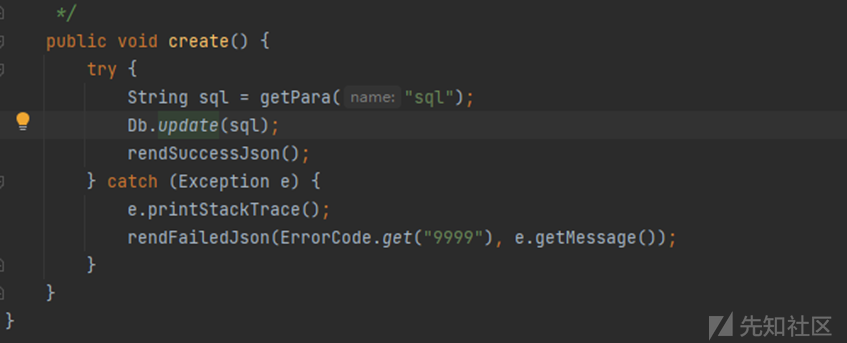
跟踪Db.update函数

继续跟踪MAIN.update


一直跟踪update到如下的方法

可以看到这里对sql没有进行任何的过滤
所以可以直接导致sql注入
XSS
Demo
public static String reflect(String xss) {
return xss;
}
//反射型XSS
public String store(String xss, HttpServletResponse response) {
Cookie cookie = new Cookie("xss", xss);
response.addCookie(cookie);
return "Set param into cookie";
}
//存储型XSS
public String show(@CookieValue("xss") String xss) {
return xss;
}
//将cookie中的XSS展示到页面中
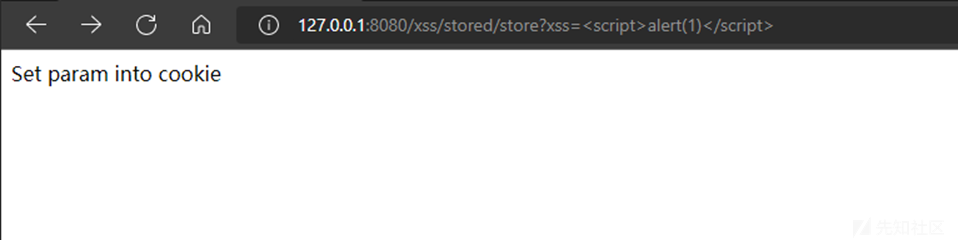
这里的存储型XSS是存储到cookie中 正常网站的存储型XSS一般都是存储到数据库中
反射型XSS图示:

存储型XSS图示:

ofcms 1.1.3版本文章评论功能存在XSS
漏洞存在处:
ofcms-admin\ofcms-api\src\main\java\com\ofsoft\cms\api\v1\CommentApi.java

save方法中 将值传入params中 并且添加评论者的ip地址之后 直接保存到数据库中
通过跟踪Db._getSqlPara_方法和Db._update_方法 并未发现其对评论者的评论进行任何过滤
payload:\alert(1)\
Security code
写入一个替换特殊符号的方法
public static String safe(String xss) {
return encode(xss);
}
private static String encode(String origin) {
origin = StringUtils.replace(origin, "&", "&");
origin = StringUtils.replace(origin, "\<", "<");
origin = StringUtils.replace(origin, ">", ">");
origin = StringUtils.replace(origin, "\"", """);
origin = StringUtils.replace(origin, "'", "'");
origin = StringUtils.replace(origin, "/", "/");
return origin;
//将各个符号进行替换
}
}
替换符号只是一种方法
或者可以检测不合法的符号,如果字段里存在不合法的符号就返回此字段不合法。
public static String safe(String xss) {
if (code(xss)=="false"){
System.out.println("参数不合法");
}
}
private static String code(String origin){
if (origin.contains(""+'&')||origin.contains(""+'\<')||origin.contains(""+'>')||origin.contains(""+'&')||origin.contains(""+'"')){
return "false";
}
return "true";
}
这只是这个想法的简单实现,对特殊符号的过滤都没写全
文件上传
Demo
public String singleFileUpload(@RequestParam("file") MultipartFile file,
RedirectAttributes redirectAttributes) {
if (file.isEmpty()) {
// 赋值给uploadStatus.html里的动态参数message
redirectAttributes.addFlashAttribute("message", "Please select a file to upload");
return "redirect:/file/status";
}
try {
// Get the file and save it somewhere
byte[] bytes = file.getBytes();
Path path = Paths.get(UPLOADED_FOLDER + file.getOriginalFilename());
Files.write(path, bytes);
redirectAttributes.addFlashAttribute("message",
"You successfully uploaded '" + UPLOADED_FOLDER + file.getOriginalFilename() + "'");
} catch (IOException e) {
redirectAttributes.addFlashAttribute("message", "upload failed");
logger.error(e.toString());
}
return "redirect:/file/status";
}
可以看到就是正常上传
可以上传任何文件 没有任何过滤之类的
security code
判断文件后缀是否为白名单 文件类型是否在黑名单中(或者在文件类型中也做一个白名单)
public String uploadPicture(@RequestParam("file") MultipartFile multifile) throws Exception {
if (multifile.isEmpty()) {
return "Please select a file to upload";
}
String fileName = multifile.getOriginalFilename();
String Suffix = fileName.substring(fileName.lastIndexOf(".")); // 获取文件后缀名
String mimeType = multifile.getContentType(); // 获取MIME类型
String filePath = UPLOADED_FOLDER + fileName;
File excelFile = convert(multifile);
// 判断文件后缀名是否在白名单内 校验1
String[] picSuffixList = {".jpg", ".png", ".jpeg", ".gif", ".bmp", ".ico"};
boolean suffixFlag = false;
for (String white_suffix : picSuffixList) {
if (Suffix.toLowerCase().equals(white_suffix)) {
//转为小写 和白名单中的后缀进行对比
suffixFlag = true;
break;
}
}
if (!suffixFlag) {
logger.error("[-] Suffix error: " + Suffix);
deleteFile(filePath);
return "Upload failed. Illeagl picture.";
}
// 判断MIME类型是否在黑名单内 校验2
String[] mimeTypeBlackList = {
"text/html",
"text/javascript",
"application/javascript",
"application/ecmascript",
"text/xml",
"application/xml"
};
for (String blackMimeType : mimeTypeBlackList) {
// 用contains是为了防止text/html;charset=UTF-8绕过
if (SecurityUtil.replaceSpecialStr(mimeType).toLowerCase().contains(blackMimeType)) {
logger.error("[-] Mime type error: " + mimeType);
deleteFile(filePath);
return "Upload failed. Illeagl picture.";
}
}
// 判断文件内容是否是图片 校验3
boolean isImageFlag = isImage(excelFile);
deleteFile(randomFilePath);
if (!isImageFlag) {
logger.error("[-] File is not Image");
deleteFile(filePath);
return "Upload failed. Illeagl picture.";
}
try {
// Get the file and save it somewhere
byte[] bytes = multifile.getBytes();
Path path = Paths.get(UPLOADED_FOLDER + multifile.getOriginalFilename());
Files.write(path, bytes);
} catch (IOException e) {
logger.error(e.toString());
deleteFile(filePath);
return "Upload failed";
}
logger.info("[+] Safe file. Suffix: {}, MIME: {}", Suffix, mimeType);
logger.info("[+] Successfully uploaded {}", filePath);
return String.format("You successfully uploaded '%s'", filePath);
}
private void deleteFile(String filePath) {
File delFile = new File(filePath);
if(delFile.isFile() && delFile.exists()) {
if (delFile.delete()) {
logger.info("[+] " + filePath + " delete successfully!");
return;
}
}
logger.info(filePath + " delete failed!");
}
/**
* 为了使用ImageIO.read()
*
* 不建议使用transferTo,因为原始的MultipartFile会被覆盖
* https://stackoverflow.com/questions/24339990/how-to-convert-a-multipart-file-to-file
*/
private File convert(MultipartFile multiFile) throws Exception {
String fileName = multiFile.getOriginalFilename();
String suffix = fileName.substring(fileName.lastIndexOf("."));
UUID uuid = Generators.timeBasedGenerator().generate();
randomFilePath = UPLOADED_FOLDER + uuid + suffix;
// 随机生成一个同后缀名的文件
File convFile = new File(randomFilePath);
boolean ret = convFile.createNewFile();
if (!ret) {
return null;
}
FileOutputStream fos = new FileOutputStream(convFile);
fos.write(multiFile.getBytes());
fos.close();
return convFile;
}
/**
* Check if the file is a picture.
*/
private static boolean isImage(File file) throws IOException {
BufferedImage bi = ImageIO.read(file); //读取图片内容
return bi != null;
}
}
这一串代码很完美的解决了文件上传产生的各种问题
文件被使用UUID库随机常见一个名字 可以防止恶意文件上传被连接访问
1.通过suffixFlag来判断文件的后缀名是否处于白名单中
2.然后使用SecurityUtil.replaceSpecialStr方法处理一下mimeType,将非0-9a-zA-Z/-.的字符替换为空,然后和黑名单类型做对比
3.通过isImage方法 判断文件是否为图片文件
以上者三个校验 有一个无法通过就会将文件直接删除。
XXE
XXE:XML External Entity 即外部实体从安全角度理解成XML External Entity attack 外部实体注入攻击。可以导致读取任意文件或SSRF、端口探测、DoS拒绝服务攻击、执行系统命令、攻击内部网站等。
Demo
public String DocumentBuilderVuln01(HttpServletRequest request) {
try {
String body = WebUtils.getRequestBody(request);
logger.info(body);
DocumentBuilderFactory dbf = DocumentBuilderFactory.newInstance();
DocumentBuilder db = dbf.newDocumentBuilder();
StringReader sr = new StringReader(body);
InputSource is = new InputSource(sr);
Document document = db.parse(is); // parse xml
// 遍历xml节点name和value
StringBuilder buf = new StringBuilder();
NodeList rootNodeList = document.getChildNodes();
for (int i = 0; i \< rootNodeList.getLength(); i++) {
Node rootNode = rootNodeList.item(i);
NodeList child = rootNode.getChildNodes();
for (int j = 0; j \< child.getLength(); j++) {
Node node = child.item(j);
buf.append(String.format("%s: %s\n", node.getNodeName(), node.getTextContent()));
}
}
sr.close();
return buf.toString();
} catch (Exception e) {
logger.error(e.toString());
return EXCEPT;
}
}
可以看到,没有进行过滤和防护,直接解析我们传入的XML文件,导致XXE
payload:
\
\
\Good Job\
\ol4three\
\2021\
\100.00\
\

Security code
public String DocumentBuilderSec(HttpServletRequest request) {
try {
String body = WebUtils.getRequestBody(request);
logger.info(body);
DocumentBuilderFactory dbf = DocumentBuilderFactory.newInstance();
dbf.setFeature("http://apache.org/xml/features/disallow-doctype-decl", true);
dbf.setFeature("http://xml.org/sax/features/external-general-entities", false);
dbf.setFeature("http://xml.org/sax/features/external-parameter-entities", false);
DocumentBuilder db = dbf.newDocumentBuilder();
StringReader sr = new StringReader(body);
InputSource is = new InputSource(sr);
db.parse(is); // parse xml
sr.close();
} catch (Exception e) {
logger.error(e.toString());
return EXCEPT;
}
return "DocumentBuilder xxe security code";
}
serFeature是关键,设置了过后,再解析xml时会直接报错
因为我对XXE了解不是很深刻 所以对于此漏洞的审计也是比较浅薄
对XXE有兴趣的师傅可以移步
https://www.freebuf.com/articles/web/318984.html
https://blog.spoock.com/2018/10/23/java-xxe/
路径遍历漏洞
Demo
public String getImage(String filepath) throws IOException {
return getImgBase64(filepath);
}
private String getImgBase64(String imgFile) throws IOException {
logger.info("Working directory: " + System.getProperty("user.dir"));
logger.info("File path: " + imgFile);
File f = new File(imgFile);
if (f.exists() && !f.isDirectory()) {
byte[] data = Files.readAllBytes(Paths.get(imgFile));
return new String(Base64.encodeBase64(data));
} else {
return "File doesn't exist or is not a file.";
}
}
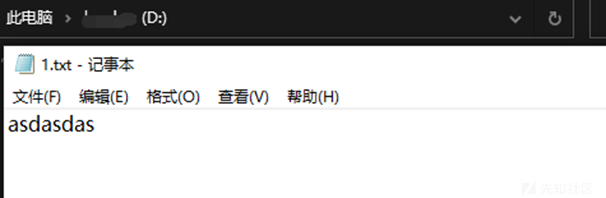
对路径参数没有进行任何过滤。简单的判断传入的路径参数存不存在,然后将文件内容base64加密返回。

Security code
public String getImageSec(String filepath) throws IOException {
if (SecurityUtil.pathFilter(filepath) == null) {
logger.info("Illegal file path: " + filepath);
return "Bad boy. Illegal file path.";
}
return getImgBase64(filepath);
}
public static String pathFilter(String filepath) {
String temp = filepath;
// use while to sovle multi urlencode
while (temp.indexOf('%') != -1) {
try {
temp = URLDecoder.decode(temp, "utf-8");
} catch (UnsupportedEncodingException e) {
logger.info("Unsupported encoding exception: " + filepath);
return null;
} catch (Exception e) {
logger.info(e.toString());
return null;
}
}
if (temp.contains("..") || temp.charAt(0) == '/') {
return null;
//对url传入的参数进行判断
}
return filepath;
}
可以看到pathFilter方法对URL传入的路径参数进行判断 ,但是判断并不完全,只是一个示例,应该根据实际情况进行改变,比如系统 Linux或者Windows又或者是业务逻辑情况,进行自定义的更改。
如果是Linux系统应该禁用/ , ..
temp.contains("..") || temp.contains("/")
Windows系统应该禁用: , .. , c , d , e, / 防止切换不同盘符进行文件读取
temp.contains("..") || temp.contains("/") || temp.contains(":") ||temp.charAt(0) == "c" ...